
What is Bug Tracking? A Practical Guide for Modern Software Team

Software bugs are the unavoidable part of the development. A payment fails under an unexpected condition. A user receives access to a feature they shouldn’t have. An API returns incorrect data. A seemingly harmless code change breaks functionality that worked perfectly in the previous release.
Sometimes these problems are discovered during development, sometimes by testers before release, and sometimes by customers in the production. Finding a bug, however, is only the beginning.
The real challenge is ensuring that is issue is properly understood, prioritized, assigned, fixed, tested, and resolved without getting lost between developers, testers, and project managers. This is where structured bug tracking becomes essential.
As AI coding assistants and autonomous coding agents accelerate development cycles, robust bug tracking is more critical than ever. While AI helps teams generate code and investigate issues faster, reliable process remain necessary to verify that defects have actually been resolved.
What is Bug Tracking?
Bug tracking is the process of identifying, recording, prioritizing, assigning, monitoring, and resolving defects in software applications. A bug is any situation where software behaves differently from its intended or expected behavior. For example, consider a subscription based application:
- Expected Behavior: Successful payment -> Active Subscription
- Actual Behavior: Successful payment -> Inactive Suscription
Without a structured bug-tracking process, the issue might be reported through a chat message, discussed during meeting, or mentioned directly to a developer. But what happens afterwards? Who investigate it? How urgent is it? Has someone already reported the same issue? Is the fix ready? Has the tester verified it? Bug tracking replaces ambiguity with a transparent, accountable workflow.
Why Bug Tracking Matters for Software Teams
A bug-tracking system is more than a list of software problems. It provides a shared source of truth for software quality across your entire engineering organization.
Prevents Bugs from Being Forgotten
During active development, teams manage numerous competing priorities. New features, customer requests, production incidents, technical improvements, and sprint commitments all compete for attention. A defect reported informally can easily disappear among those activities. Recording bugs in a centralized system ensures that they remain visible until an appropriate decision or resolution is reached.
Establishes Clear Ownership
Every actionable bug should have a clear owner. Without ownership, a defect may remain unresolved because everyone assumes someone else is handling it. Assigning responsibility helps teams understand who is investigating the issue, implementing the fix, and coordinating its validation.
Helps Teams Prioritize Problems
Not every bug requires immediate attention. A minor visual inconsistency and a security vulnerability should not receive the same treatment. Bug tracking helps team distinguish between issues that require urgent intervention and those that can be addressed during normal development.
Improve Developer-Tester Communication
A tester may discover a defect but lack detailed knowledge of the implementation. A developer may understand the code but not the exact conditions that caused the failure. A well-maintained bug report creates a common reference point. Both parties can discuss the same expected behavior, actual behavior, reproduction steps, and supporting evidence.
Create Visibility Into Software Quality
Project Managers and engineering leaders need to understand more than how many features are being developed. They also need visibility into unresolved defects, critical issues, review queues, and recurring quality problems. Bug tracking provides the operational information required to make informed release decisions.
Understanding the Software Bug Lifecycle
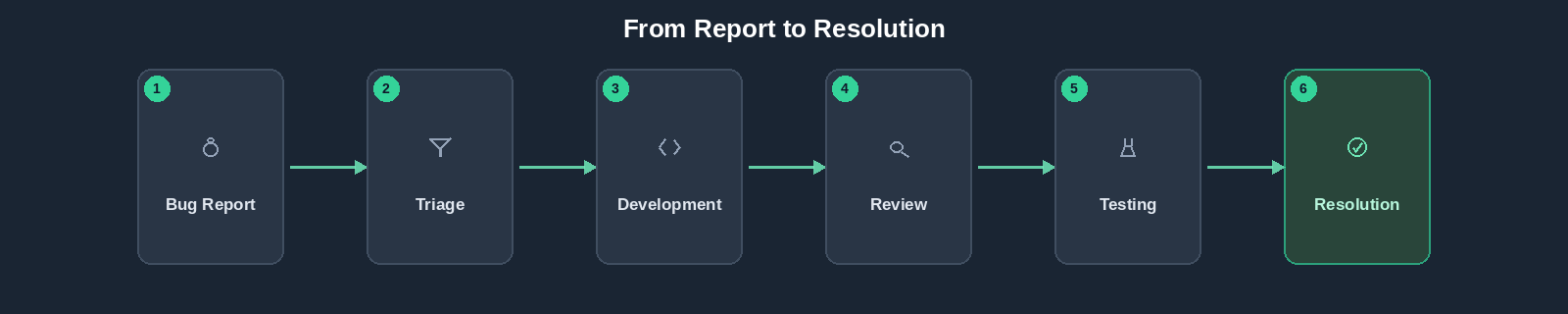
The bug lifecycle also called as defect lifecycle, describes the stages a bug passes through from discovery to resolution. Different organizations use different workflows, but the underlying objective remains the same: ensure that reported issues are investigated, resolved appropriately, and verified. A practical workflow might look like this:
Let’s examine each stage.
- New: A bug is reported and enters the system awaiting validation.
- Assigned: Ownership is established; a developer or engineer is designated to investigate.
- In Progress: the developer reproduces the issue, analyzed the logs, and implements a fix.
- Ready for Review: The proposed fix is complete and ready for QA validation.
- In Review: A reviewer or tester validates the correction against regression risks and acceptance criteria.
- Resolved: The bug has been successfully addressed and verified.
- Rejected / Not a Bug: Invalid reports, duplicates, or expected behaviors are appropriately closed without forcing unnecessary code changes.
What Information Should a Good Bug Report Contain?
A poor bug report (“Subscription is not working”} wastes engineering hours. A professional bug report provides immediate context:
- Bug ID & Title: Concise summary (e.g., Subscription remains inactive after successful payment).
- Environment & Severity: Staging vs. Production impact
- Expected vs. Actual Results: Clear breakdown of the discrepancy.
- Supporting Evidence: Payment references, logs, screenshots, and API responses
Bug Severity vs. Bug Priority
- Severity describes how seriously the defect affects the software or users
- Priority describes how urgently the team must address it
For instance, a minor company logo glitch during a major product launch carries Low Severity but High Priority, while a rare legacy integration bug might carry High Severity but Low Priority. Separating these dimensions ensures team focus on business impact and security risks first.
Connecting Tasks, Test Cases, and Bugs
In modern workflows, bugs should never exist in silo. By connecting:
Developers instantly know which requirement failed, testers know what is being retested, and project managers gain clear visibility into delivery risks.
How AI Coding Agents are Changing Bug Tracking
AI is changing how software teams write code. It is also changing how teams investigate and resolve bugs. Traditional debugging often requires a developer to manually inspect logs, trace execution paths, search the codebase, and experiment with possible fixes. AI coding agents can assist with several of these activities. Depending on their capabilities and the access provided, agents may help:
- Analyze bug descriptions
- Search relevant part of the codebase
- Inspect application logs
- Identify potentially related changes
- Suggest possible root causes
- Generate candidate fixes
- Run available tests
- Summarize implementation changes
These capabilities can make defect investigation more efficient. But there is an important distinction: A generated fix is not necessarily a verified fix. The generated fix might correct the most obvious failure while leaving another scenario unresolved. The agent may have implemented a reasonable solution based on incomplete context. This does not make the tool useless. It means team must distinguish between: Proposed Correction and Validated Resolution. This distinction should remain visible in the bug-tracking workflow.
Can AI Agents Introduce New Bugs While Fixing Existing Ones?
The answer is obviously ‘Yes’. Like human developers, AI coding agents can rapidly analyze bug descriptions, search codebases, suggest root causes, and generate candidate fixes. However, a generated fix is not automatically a verified fix.
AI can make incorrect assumptions or overlook edge cases (such as fixing a permission check while accidentally breaking tenant isolation). Team must distinguish between proposed corrections and verified resolutions, maintaining rigorous testing and review standards regardless of whether code is written by a human or an AI agent. So, remember, “AI can accelerate debugging, but it does not eliminate the need for engineering judgement.”
What is Bug Triage?
Bug triage is the process of reviewing reported issues and deciding what should happen next. A triage discussion typically addresses:
- Is the report valid?
- Can the issue be reproduced?
- Is it already reported?
- How serious is the impact?
- Which users or workflows are affected?
- Does it require immediate action?
- Who should investigate it?
- Should it be addressed in the current sprint or scheduled later?
For a small development team, triage may be handled by the project manager or technical lead. For a larger organization, it may involve QA leads, engineering managers, product owners, or support teams. The process does not need to be complicated, But decisions should be consistent. Triage ensures that the team prioritizes impact rather than simply processing issues in chronological order.
How Should Teams Measure Bug-Tracking Effectiveness?
Bug counts alone do not tell the complete story. A team with 100 reported bugs is not necessarily performing worse than a team with 20. The first team may be testing more thoroughly, serving more users, or working on a more complex product. The first team may be testing more thoroughly, serving more users, or working on a more complex product. Instead, teams should consider several complementary indicators.
| Metric | What It Helps Explain |
| Open Bugs | Current unresolved defect workload |
| Critical or High-Severity Bugs | Serious outstanding quality risks |
| Average Resolution Time | How long issues take to resolve |
| Bug Reopen Rate | How often fixes fail validation or issues recur |
| Bugs by Status | Where defects are accumulating |
| Bug Age | How long unresolved issues have remained open |
| Production Defects | issues escaping into production |
| Regression Defects | Previously working functionality affected by changes |
These metrics should be interpreted in context. For example. a reduction in reported bugs may indicate improved quality. But it could also indicate reduced testing activity. Similarly, faster resolution times are not necessarily positive if fixes frequently need to be reopened. The objective is to improve the reliability of the software, not simply make the bug dashboard look better.
Bug Tracking in Modern Software Team: What is Changing?
Software development is moving towards greater automation. AI coding agents can assist with implementation. AI tools can help generate test cases. Automatic testing can detect regressions. Monitoring systems can identify unexpected behavior in production. These developments may reduce the time required to discover and investigate certain defects. But they also change the nature of the quality management.
As generating and modifying code becomes easier, teams may produce more changes in less time. That creates a greater need for the visibility into:
- Which defects are genuine
- Which fixes are awaiting validation
- Which bugs are repeatedly reopened
- Which bugs introduced regressions
- Which workflows carry the greatest risk
- Whether the overall quality of delivered software is improving
The future of bug tracking is therefore not simply about closing bugs faster. It is about building a more reliable connection between requirements, implementation, testing, defect resolution, and production quality. AI can support at each stage. The responsibility for ensuring that software behaves correctly remains with the team delivering it.
Frequently Asked Questions
Bug tracking focuses specifically on software defects. Issue tracking is broader and may include bugs, tasks, feature requests, technical improvements, support requests, and other work items.
A common workflow includes New, Assigned, In Progress, Ready for Review, In Review, and Resolved. Organizations may add or modify statuses according to their development and QA processes.
Bugs may be reported by testers, developers, customers, support teams, automated monitoring systems, or other stakeholders. The reporting source does not determine whether an issue is valid or how it should be prioritized.
A bug describes software behavior that does not meet an existing requirement or reasonable expected behavior. A feature request proposes new or changed functionality. Some reports require clarification because expected behavior was never formally defined.
Bugs that require development effort should be considered when planning sprint capacity. Critical production defects may also need to be addressed during an active sprint, even if they were not part of the original scope.
AI coding agents can investigate issues and generate candidate fixes, sometimes with little manual coding. However, generated fixes still requires appropriate review, testing, and validation before being accepted.
Teams can reduce reopening by investigating root causes, documenting reproduction steps, adding appropriate regression tests, validating related functionality, and ensuring that fixes meet clear acceptance criteria.
A useful bug-tracking system provides clear reporting, ownership, prioritization, lifecycle visibility, collaboration, related-work context, and enough historical information to understand defect trends.
Bug Tracking is About Building Reliable Software
Finding bugs is important. Fixing them is important. But neither activity is sufficient on its own. Software teams need a reliable process that connects defects discovery with investigation, ownership, correction, validation, and resolution. That process becomes increasingly important as AI-assisted development accelerates implementation and debugging. A coding agent may identify a potential fix in minutes. A developer may implement a correction quickly. An automated test may pass. But the question that ultimately matters is:
Effective bug tracking helps teams answer that question with evidence rather than assumptions. Platform such as Deskfactor support this approach by connecting bug management with development tasks, test cases, review workflows, and project execution. Because the goal of bug tracking is not simply to maintain a list of defects, “It is to help team deliver software that users can trust.”