
What Is Sprint Planning? A Practical Guide for Modern Software Teams

Sprint planning has always been about answering a seemingly simple question: What can our team realistically deliver during the next sprint? But answering that question is becoming more complex.
Modern software teams are not working the same way they did a few years ago. Developers increasingly use AI coding assistants and agents to generate code, understand unfamiliar systems, write tests, refactor applications, create documentation, and troubleshoot problems. While AI can accelerate parts of development considerably, faster code generation does not automatically mean that a team can commit to proportionally more work. Generated code still needs to be understood, reviewed, integrated, tested, secured, and accepted.
That makes good sprint planning more important—not less. Sprint planning is the process of defining a sprint goal, selecting the work the team intends to complete, evaluating available capacity and dependencies, and establishing a realistic delivery commitment for the sprint, accounting for both human capacity and AI-assisted development workflows.
What Is a Sprint?
A sprint is a fixed period during which an Agile software team works toward a defined goal. A sprint may last one, two, three, or four weeks depending on the team’s development process, although teams should generally maintain a consistent cadence.
During a sprint, the team works on a selected set of backlog items such as:
- User Stories
- Development Tasks
- Technical Improvements
- Bugs
- Testing Activities
- Documentation
- Infrastructure Work
The sprint provides a shorter planning horizon within a larger project. Instead of attempting to predict exactly what will happen over several months, the team asks:
What is Sprint Planning?
Sprint planning is the activity through which the team determines the goal and intended scope of an upcoming sprint. A good sprint plan should answer several questions:
- What are we trying to achieve?
- Which work is more important?
- Are the selected task ready for development?
- How much capacity does the team actually have?
- What dependencies could affect delivery?
- How much review and testing will be required?
- What unfinished work is being carried forward?
- What risks could affect the commitment?
Sprint planning should therefore be more than moving tasks from a backlog into a sprint.
Sprint Planning vs. Sprint Execution vs. Sprint Review
These activities are related but serve different purposes.
| Activity | Primary Question | When it Happens |
| Sprint Planning | What should we commit to? | Before the sprint |
| Sprint Execution | How are we progressing against the plan? | Throughout the session |
| Sprint Review | What did we actually deliver? | At or near sprint completion? |
Teams often focus heavily on execution while giving too little attention to planning. But poor sprint execution frequently begins with a poor sprint plan. If tasks are unclear, capacity is unrealistic, dependencies are unknown, or testing effort is ignored before the sprint starts, the team begins with problems already built into the plan.
What Should Happen Before Sprint Planning?
Good sprint planning starts before the planning meeting. The backlog should contain sufficiently refined work so that the team can make informed decisions. Ideally, candidate tasks should already contain information such as:
- Clear Title
- Description
- Acceptance Criteria
- Priority
- Estimate
- Dependencies
- Relevant Technical Context
- Expected Outcome
A task such as:
is not ready for the meaningful sprint planning.
The team does not know whether “billing” means displaying the current subscription, integrating a payment gateway, generating invoices, changing plans, handling failed payments, or all of them. A better approach is to break the requirement into independently manageable pieces. Clear task definition becomes even more important when teams use AI-assisted development.
For a foundation on structuring work effectively, see our guide: What Is Task Management? A Practical Guide for Software Teams.
Why Clear Requirements Matter Even More in AI-Assisted Development?
AI can generate implementation quickly when requirements are clear, but it can also accelerate work in the wrong direction when requirements are ambiguous. Consider a task:
A developer would still needs to understand:
- Does cancellation happens immediately?
- Does access continues until the billing period ends?
- Are refunds supported?
- What happens to unused credits?
- Can an administrator reverse cancellation?
- What happens to organization data?
- What notifications are sent?
An AI coding tool may be capable of generating a cancellation workflow before these questions have been answered. That does not eliminate ambiguity. It converts ambiguity into code. For AI-assisted development, task quality therefore becomes increasingly important. The task should provide sufficient context and acceptance criteria for both the developer and the tools assisting the developer.
Who Should Participate in Sprint Planning?
Sprint planning should involve the people necessary to understand both what needs to be delivered and what is realistically possible. Depending on the organization, this may include:
- Project Manager or Scrum Master
- Product Owner
- Developers
- Testers or QA Engineers
- Technical Leads
- Designers when relevant
- Business Analysts when clarification is required
Developers and testers should not simply receive a sprint commitment created for them; they possess vital information about technical complexity, testing requirements, and existing workload.
This becomes particularly important when AI tools are involved. A project manager should not assume that because a developer uses an AI coding assistant, every development task will take substantially less time. The people performing the work are better positioned to explain where AI is helping and where significant human effort is still required.
Step-by-Step Guide to Effective Sprint Planning
Step 1: Define the Sprint Goal
Establish what a sprint is intended to achieve before selecting individual tasks. A weak sprint goal might be:
A stronger goal might be:
a new customer can register, verify their account,
select a plan, and access their workspace.
The second goal provides direction. When unexpected work appears during the sprint, the goal can help the team determine whether the new work is important enough to disrupt the current plan. A sprint should not simply be a container of unrelated tasks.
Step 2: Review the Priorities
The team should understand which backlog items matter most. Priority may be influenced by:
- Customer Commitments
- Business Value
- Dependencies
- Production Issues
- Security Concerns
- Release Requirements
- Technical Risk
- Regulatory Requirements
- Other Teams Waiting for the Work
Priority should not be determined solely by who requested something most recently. A clearly prioritized backlog makes sprint selection easier.
Step 3: Check Whether Tasks are Ready
Before committing a task, ask whether the team has enough information to start it. A task may not be sprint-ready when:
- Requirements are unclear
- Acceptance criteria are missing
- A technical decision is pending
- Designs are unavailable
- Another task must be completed first
- External access is required
- A third party has not provided information
- The estimate contains too much uncertainty
Adding a task that is not ready to a sprint does not make it ready. It simply moves the uncertainty to the sprint.
Step 4: Understand the Team’s Real Capacity
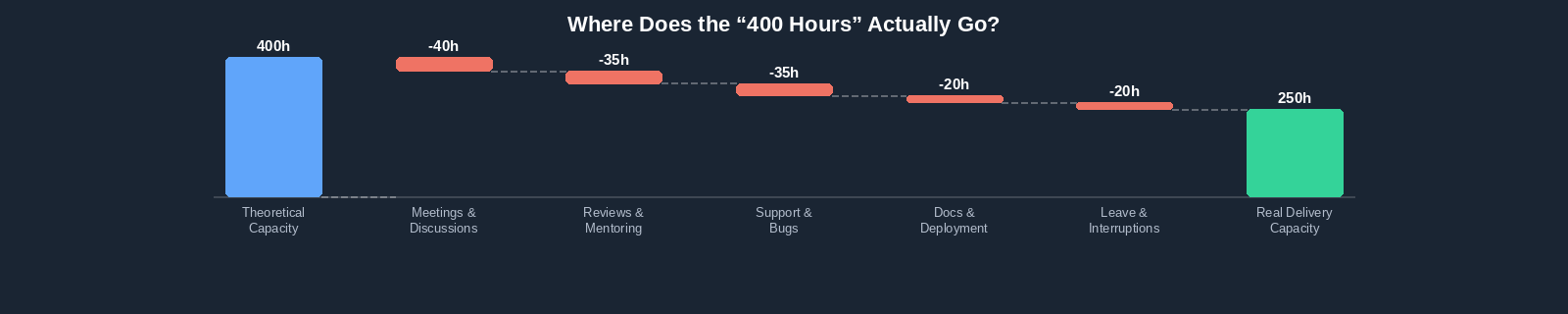
One of the most important parts of the sprint planning is capacity. Suppose a team has five developers working an eight-hour day for ten working days. At first glance, the capacity might be assumed to be:
But actually the team does not have 400 hours of development capacity. Time may also be required for:
- Meetings
- Code Reviews
- Production Support
- Technical Discussions
- Documentation
- Mentoring
- Bug Investigation
- Deployment Activities
- Unplanned Interruptions
- Leave and holidays
Testing capacity should also be considered. A sprint can have enough development capacity while having insufficient QA or review capacity. The correct question is not:
It is:
How AI Changes Sprint Capacity Planning?
This is where the modern sprint planning becomes particularly interesting. AI tools can reduce the time required for certain development activities. Developers may use AI for:
- Generating boilerplate code
- Creating CRUD operations
- Understanding existing code
- Suggesting implementation approaches
- Refactoring
- Generating unit tests
- Writing documentation
- Troubleshooting errors
- Creating initial prototypes
That creates real productivity opportunities. However, teams should avoid simplistic calculation such as:
This linear simplification is dangerous. AI does not affect every task equally. Consider these two tasks:
Task A: Create standard CRUD API for an existing entity.
Task B: Redesign a multi-tenant authorization model involving complex business rules.
AI may dramatically, reduce implementation time for Task A. Task B may still require significant architectural reasoning, security analysis, discussion, validation, and testing. A single “AI productivity multiplier” therefore provides a weak basis for sprint planning.
AI Changes Where Development Effort Happens
Traditional planning often assumes much of the effort occurs during implementation. AI-assisted development can shift that distribution. A simplified traditional workflow may look more like:
An AI-assisted workflow may look more like:
Generation may become much faster. But verification becomes increasingly important. This is not just theoretical. The 2025 Stack Overflow Developer Survey found that AI adoption among developers was already widespread, while more developers reported distrusting AI-output accuracy than trusting it. Developers also identified “almost correct” AI solutions and additional debugging effort as major frustrations.
For sprint planning, the implication is straightforward:
Estimate the time required to deliver trusted, working software.
Step 5: Estimate the Work
Software estimates are never perfect. Their purpose is not to predict the future with absolute precision. Their purpose is to help teams make better commitments. Teams may estimate using:
- Story points
- Hours
- Task complexity
- Historical throughput
Whatever method is used, estimates should consider the complete effort required, which may include:
In AI-assisted development, teams may eventually build historical knowledge about which categories of work benefit most from AI. For example, a team may discover that AI significantly accelerates routine API implementation but provides much less improvement for complex integrations. That information can gradually improve future sprint planning.
Step 6: Identify Dependencies
Dependencies are a major source of the sprint risk. A task may depend on:
- Another-backend API
- A frontend component
- Database changes
- Infrastructure
- Design Approval
- Client Clarification
- External API access
- Another project
- A third-party vendor
If Task B cannot start until Task A is completed, simply placing both in the same sprint does not remove the dependency. The sequence should be considered during planning. Where possible, high-risk dependencies should be resolved before the sprint begins.
Step 7: Plan for Review Capacity
AI-assisted development creates another capacity question:
the team can review it?
Imagine three developers previously produced six reviewable changes during a particular period. With AI assistance, they now produce twelve. With AI assistance, they now produce twelve. If the same senior developer still performs most reviews, overall delivery may not double. Instead, work accumulates here at “Ready For Review” state.
The bottleneck has moved. This is one reason measuring developer productivity purely by generated code or completed implementation activity can be misleading.
Sprint planning should consider review capacity, especially when AI significantly increases implementation throughput.
Step 8: Plan for Testing Capacity
The same problem can occur in QA. Faster implementation can result in more functionality reaching testers simultaneously. If testing capacity remains unchanged:
That is not necessarily a development productivity problem. Team should therefore consider:
- Number of testers
- Test complexity
- Regression requirements
- Environment availability
- Automation coverage
- Expected bug-fix cycles
- Retesting effort
AI can help here too. AI-assisted tools can generate candidate test scenarios or test cases from requirements, reducing some repetitive preparation work. But generated test cases still need human review. A tester understands business risk, unusual user behavior, integration impact, and contextual edge cases that may not be obvious from the task description alone.
Step 9: Select the Sprint Scope
Once priorities, readiness, estimates, capacity, dependencies, review requirements, and testing requirements are understood, the team can select the sprint scope. The objective should not be:
The objective should be
Planning to 100% theoretical capacity leaves little room for uncertainty. Software development contains uncertainty by nature. A technically difficult task may take longer than expected. A bug may appear. A production issue may require attention. A good sprint plan recognizes this reality.
Step 10: Establish the Baseline
At the start of the sprint, the team should know what was originally planned. This creates an important baseline:
Without that baseline, later analysis becomes difficult. Suppose the team begins with:
- 24 tasks
- 100 story points
During the sprint, urgent work is added:
- 5 additional tasks
- 20 additional story points
At the end, the team completes:
- 24 tasks
- 100 story points
Did the team succeed or failed? Looking only at the final scope:
That may appear to be a poor sprint. But the team actually delivered entire amount of work originally planned. The missing context is:
This is why sprint scope changes should be visible.
What Should Happen When New Work Appears Mid-Sprint?
Mid-sprint changes are not automatically bad. Real project change. A critical production bug should not wait simply because sprint planning happened three days earlier. But new work should trigger decision. When adding significant work, ask:
- Why must this enter the current sprint?
- What effort is required?
- Does it support the sprint goal?
- What existing work should be deprioritized?
- Does the sprint commitment need to change?
The mistake is not changing to the sprint. The mistake is changing the sprint without acknowledging the impact.
Can AI Help With Sprint Planning?
Yes—but it should assist planning rather than make the commitment independently. AI can be useful for:
- Breaking epics into candidate tasks
- Identifying missing implementation areas
- Suggesting acceptance criteria
- Identifying potential dependencies
- Summarizing backlog information
- Suggesting test scenarios
- Highlighting unusually large tasks
- Analyzing historical execution patterns
For example, a project manager could use AI to generate an initial task breakdown from a detailed epic. The team can then review:
- Is anything missing?
- Are these tasks independently deliverable?
- Are the estimate realistic?
- What dependencies exists?
- Which tasks require specialist knowledge?
AI reduces the administrative starting effort. The team retains the delivery decision.
What AI Should Not Decide Alone?
AI should not independently determine:
- Final sprint commitment
- Business priority
- Production risk
- Security acceptance
- Whether generated code is correct
- Whether testing is sufficient
- Whether a requirement has been satisfied
There is an important distinction between:
and
Modern project management needs to preserve that distinction. Research from DORA describes AI as an amplifier: organizations with strong underlying engineering systems can gain considerably, while weaknesses in those systems can also be magnified. That makes disciplined planning, review, testing, and delivery processes even more valuable in an AI-assisted development environment.
Common Sprint Planning Mistakes
Several problems repeatedly reduce sprint predictability.
Committing Too Much Work
Teams sometimes treat sprint planning as an exercise in maximizing utilization. A completely full plan leaves little room for uncertainty.
Adding Tasks That Are Not Ready
Unclear requirements create delays during execution.
Ignoring Dependencies
A task may appear small but remain blocked for half the sprint.
Planning Only Developer Capacity
Reviewers and testers are also part of delivery capacity.
Assuming AI Makes Every Task Faster
AI productivity varies considerably by task type and context.
Ignoring AI Verification Effort
Generated implementation still requires validation.
Treating Development Complete as Done
Work waiting for review or QA is unfinished work.
Ignoring Mid-Sprint Tasks
Additional scope changes the meaning of sprint completion metrics.
A Practical Sprint Planning Checklist
Before starting a sprint, the team should be able to answer:
| Area | Question |
| Goal | Do we have clear sprint goal? |
| Priority | Are the most important items selected first? |
| Task Readiness | Are requirement and acceptance criteria clear? |
| Estimates | Has the complete delivery effort has been considered? |
| Capacity | Have leave, meetings, support, and other commitments been considered? |
| Dependencies | Are important dependencies understood and taken account of? |
| Review | Is sufficient review capacity available? |
| QA | Is sufficient testing capacity available? |
| AI | Have we considered where AI actually changes effort? |
| Verification | Have we accounted for reviewing AI-assisted output? |
| Risk | Which tasks contain the most uncertainty? |
| Scope | Is the original sprint commitment recorded? |
If many of these questions cannot be answered, the team may not yet have a reliable sprint plan.
How Should Teams Measure Sprint Success?
Sprint success should not be reduced to one number. For example: We completed 82% of the sprint. That number needs a context. A useful review should consider:
- Original planned work
- Final sprint scope
- Completed work
- Work added during the sprint
- Work removed from the sprint
- Carryover
- Blocked work
- Review bottlenecks
- Bugs and rework
- Estimated vs Actual Effort
- Whether the sprint goal was achieved
As AI increases the amount of implementation teams can potentially produce, these flow-oriented measures become even more important. Counting generated code, commits, or tasks alone tells us very little about delivered customer value.
Sprint Planning in the AI Era
AI is changing software development. According to the 2025 Stack Overflow Developer Survey, 84% of respondents were already using or planning to use AI tools in development, while 51% of professional developers reported daily use.
At the same time, developers remained cautious about AI accuracy: 46% reported distrusting AI output compared with 33% who trusted it. The lesson for project managers is not that AI should be avoided.
The lesson for project managers is not that AI should be avoided. It is that AI productivity and delivery productivity are not automatically the same thing.
DORA’s research reaches a similar conclusion at the organizational level: AI can amplify an organization’s existing engineering capabilities, but it can also amplify weaknesses in the delivery system.
A team with:
- Clear requirements
- Good task decomposition
- Strong reviews
- Reliable testing
- Good technical practices
- Visible project execution
is better positioned to convert AI speed into actual delivery improvement.
A team with poor requirements, weak testing, and unclear ownership may simply produce incorrect work faster.
Frequently Asked Questions
Sprint planning is the process of defining a sprint goal, reviewing available capacity, selecting ready work, identifying dependencies and risks, and agreeing on a realistic scope for the upcoming sprint.
Sprint planning normally involves the people responsible for defining, implementing, and validating the work. Depending on the team, this may include the product owner, project manager or Scrum Master, developers, testers, technical leads, designers, and business analysts.
The team should select work based on realistic delivery capacity rather than theoretical working hours. Historical throughput, task complexity, dependencies, review capacity, testing capacity, leave, support obligations, and uncertainty should all influence the commitment.
AI may increase capacity for certain types of work, but teams should not apply a fixed productivity multiplier to every task. Measure how AI affects actual throughput, review effort, testing, rework, and quality across several sprints before adjusting commitments.
AI can assist sprint planning by proposing task breakdowns, identifying dependencies, summarizing backlog information, or analyzing historical patterns. The final sprint goal, priority, scope, risk decisions, and commitment should remain with the responsible team.
Estimate the complete effort required to deliver working software—not just the time needed to generate code. Validation, integration, review, testing, debugging, security checks, and potential rework should still be considered.
Sometimes. Production issues, urgent customer requirements, or other critical work may require a scope change. The new work should be tracked, its impact evaluated, and existing commitments reconsidered when necessary.
Better Sprint Planning Means Better Delivery Decisions
The purpose of sprint planning is not to predict everything that will happen. It is to make the best delivery commitment possible with the information currently available. Modern software teams need to consider more than backlog size and developer availability. They need visibility into:
AI can accelerate important parts of this workflow. But the objective of a sprint is not to generate more code. The objective is to deliver working, validated software that moves the project toward its goal. That distinction will become increasingly important as AI becomes a normal part of software development.
For teams using Deskfactor, sprint planning can connect the sprint goal, planned capacity, tasks, estimates, execution progress, and changes introduced during the sprint—helping project managers understand both what was originally planned and what actually happened during delivery.
Next: Why Sprints Fail: Common Sprint Planning and Execution Mistakes—and How Modern Software Teams Can Avoid Them