
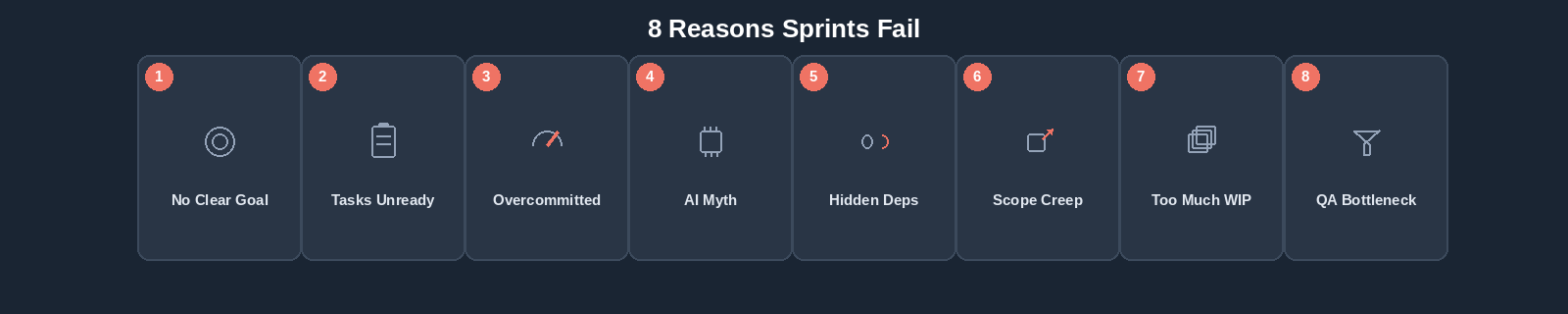
Why Sprints Fail: 8 Common Sprint Planning and Execution Mistakes

A sprint starts with confidence. The backlog has been discussed, tasks has been assigned, estimates look reasonable, and everyone knows the sprint end date.
A few days later, realty looks different: a task is blocked, another is larger then expected, urgent requirements are added, code piles up for review, QA is overloaded, and an AI-generated implementation require heavy debugging. By the end of the sprint, several tasks roll over.
What went wrong? A failed sprint is rarely a team-performance problem; rather, it stems from planning assumptions, workflow bottlenecks, changing scope, hidden dependencies, and late identification of problems. Furthermore, AI-assisted software development adds a new layer – faster implementation does not automatically mean faster delivery.
What Does It Mean for a Sprint to Fail?
Before discussing why sprints fail, we need to define what failure actually means.
A sprint should not automatically be considered unsuccessful simply because every planned task was not completed.
Consider two teams:
Team A
- Planned: 100 story points
- Completed: 90 story points
- Sprint goal: Achieved
The remaining 10 story points where lower-priority tasks that did not prevent the team from achieving the primary objective of the sprint.
Team B
- Planned: 100 story points
- Completed: 90 story points
- Sprint goal: Not Achieved
In this case, one of the incomplete tasks was essential to the sprint goal. Perhaps the team completed most of the supporting work, but the critical integration required to make the feature usable was still unfinished.
Both teams completed:
But the outcome was very different. Team A delivered the intended sprint outcome, whereas Team B completed the same amount of work but did not deliver the outcome the sprint was created to achieve.
This illustrates an important principle:
It does not, by itself, tells you whether the sprint achieved its goal.
A sprint should therefore be evaluated with additional context, including:
- Whether the sprint goal was achieved
- Original planned scope
- Work completed
- Work added during the sprint
- Work removed from the sprint
- Carryover
- Blocked work
- Bugs and rework
- Review and testing bottlenecks
- Changes in estimates
- Unexpected dependencies
A sprint is better understood as a delivery commitment towards an outcome, not simply a container of story points that needs to be emptied.
Here are eight common reasons software sprints fail, along with actionable ways modern teams can address them.
1. The Sprint Starts Without a Clear Goal
One of the easiest ways to create an unfocused sprint is to start with:
The result may be a collection of individually useful tasks that do not contribute toward a clear outcome. For example a sprint might contain:
- Update the registration UI
- Fix reporting API performance
- Add a billing field
- Change bug status
- Update dashboard KPIs
- Refactor notification service
- Add two admin screens
Every task may be legitimate. But what this sprint is trying to achieve? Without a clear sprint goal, prioritization becomes difficult when something changes. Imagine an urgent requirement appears halfway through the sprint. Should the team accept it? If there is no sprint goal, then decision often becomes: “It sounds important. Add it”. If we have a clear goal, the team can instead ask: “Does this help us achieve the outcome we committed to for this sprint?”
How to fix it
Define an outcome-focussed sprint goal before finalizing the scope. Instead of saying “Complete onboarding tasks,” use:
Remember: Tasks should support the goal rather then define it.
2. Tasks Enter the Sprint Before They are Ready
Moving a task into a sprint without a clear description or acceptance criteria forces developers to waste time discovering requirements during implementation.
AI makes unclear tasks more dangerous. AI-assisted coding makes task readiness even more important. A human developer faced with an unclear requirement may stop and ask questions. An AI coding agent may produce an implementation based on the incomplete context. That can create situations and accelerating the path of:
AI did not cause the requirement problem. It accelerated the consequences of it. As AI becomes more capable, clear task descriptions, constraints, business rules, and acceptance criteria becomes increasingly valuable.
How to fix it
Before committing work to a sprint, check whether it is sufficiently ready. A sprint-ready task should normally have:
- A clear objective
- Sufficient description
- Acceptance criteria
- Known dependencies
- Relevant designs where required
- Appropriate technical context
- A reasonable estimate
- A clear expected outcome
Not every uncertainty needs to disappear. Software development always contains uncertainty. The objective is to remove avoidable uncertainty before the sprint begins.
3. The Team Commits More Work Than It Can Realistically Deliver
Sprint capacity is often calculated too optimistically. Suppose four developers are available for ten working days. A simple calculation gives:
So the team plans close to 320 hours of work. But those developers also spend time on:
- Meetings
- Code reviews
- Production support
- Technical discussions
- Helping other team members
- Documentation
- Deployment
- Bug Investigation / fixing
- Unexpected interruptions
Someone may also take leave. So, the team’s theoretical capacity and its delivery capacity are not the same.
How to fix it
Use realistic capacity based on the actual team behavior. Historical delivery information is particularly useful. Look at previous sprints:
- How much work was planned?
- How much was completed?
- How much unplanned work appeared?
- How much effort went into bugs?
- How much time was spent reviewing?
- How much work was carried over?
Sprint planning improves when estimates are combined with actual historical execution.
4. Teams Assumes AI Productivity means Proportionally More Sprint Capacity
This is becoming one of the most important planning mistakes for modern software teams. A developer starts using an AI coding assistant or coding agent and as a consequence development becomes faster. Management observes the imporvement and concludes:
This calculation is tempting, but is also unreliable. AI does not improve every type of development work equally. It may significantly accelerate:
- Boilerplate generation
- Standard CRUD functionality
- Initial prototypes
- Unit-test generation
- Documentation
- Code explanation
- Routine refactoring
But improvement may be smaller for:
- Complex business logic
- Architecture
- Security-sensitive functionality
- Legacy-system changes
- Difficult integrations
- Production debugging
- Requirements involving substantial ambiguity
And generated output still requires verification.
How to fix it
Do not apply a fixed “AI multiplier” to sprint capacity. Instead measure actual results across several sprints. Track the:
- Task types
- Estimates
- Actual effort
- AI-assisted vs non-AI-assisted work where useful
- Review effort
- Testing effort
- Rework
- Bugs
- Completed throughput
Over time, the team can understand where AI actually changes its delivery capacity. The correct question is not:
It is:
5. Dependencies Are Discovered During the Sprint
A task may appear completely reasonable during planning. Two days into development, the developer discovers that another API must first be completed. That API depends on the a database change. The database change is assigned to someone working on another priority. The original task is now blocked. Nothing about the task itself changed. The dependency was simply discovered too late.
How to fix it
Identify important dependencies during refinement and sprint planning. Ask:
- Does this task depend on another task?
- Does another team need to provide something?
- Do we need access to an external service?
- Is a design decision pending?
- Does infrastructure need to change?
- Does an API need to exist first?
- Is client clarification required?
When dependencies must remain inside the same sprint, plan their sequence deliberately. A sprint board should not merely show what work exists. It should help the team understand what is preventing work from moving.
6. New Work Continuously Enters the Sprint
This scenario will be familiar to many software teams.
Monday: Sprint Finalized.
Tuesday: Can we add this small client change?
Wednesday: There is an urgent production bug.
Thursday: Management needs this report before Friday.
Next Monday: We also need one API change.
None of these requests may be reasonable. But the sprint is no longer the sprint that was originally planned. Suppose the team begins with:
100 story points
During the sprint:
25 story points are added
At the end:
100 story points are completed
Looking only at final scope gives:
100 / 125 = 80% completion
That suggests the team significantly missed its commitment. But the team delivered the entire amount of work originally planned. The important information is not merely the completion percentage. It is that scope increased by 25% during execution.
How to fix it
Track the original sprint scope separately from the final sprint scope. For significant additions, capture:
- What was added?
- When it was added?
- Why it was added?
- How much effort it introduced?
- Whether another task was removed?
- Whether the sprint goal changed?
Urgent work will always exist. The goal is not to prevent change. The goal is to make it impact visible.
7. Too Much Work is Started and Too Little Work is Finished
Consider a team with ten developers. Suppose:
- Eight tasks are in progress
- Six more are Ready for Review
- Another Four are partially implemented
So the situation is that everyone is busy yet very little is reaching Done. This is a flow problem. Starting more work can make the situation worse because:
- Context switching increases
- Dependencies become harder to coordinate
- Reviews accumulate
- Testing happens later
- Problems are discovered later
- More unfinished work exists simultaneously
AI can amplify this problem. AI tools can make starting work extremely easy. A developer can quickly generate:
- A new component
- An API skeleton
- Database migrations
- Tests
- Documentation
That can create the impression of rapid progress. But partially generated or partially validated work is still work in progress. DORA’s 2025 research characterizes AI as an amplifier: organizations with strong engineering systems can benefit substantially, while weaknesses in those systems can also be magnified. A team that already starts too much work may use AI to start even more work.
How to fix it
Focus on finishing rather than starting. Monitor:
- Work in progress
- Age of in Progress tasks
- Review queue
- Testing queue
- Blocked work
- Cycle time
When work begins accumulating at on stage, adding more work upstream rarely solves the problem.
8. Development Speeds Up but Review and QA Become Bottlenecks
Imagine a development team before widespread AI assistance. Developers complete approximately ten tasks per week. QA can validate approximately ten. The workflow is balanced. Now AI-assisted development increases implementation throughput. Developers can prepare fifteen tasks. QA can still validate ten.
So, after one week: Five tasks waiting. After another: 10 tasks waiting. Development productivity increased. Delivery throughput did not increase by the same amount. The bottleneck moved. The same thing can happen with code review. A senior developer may suddenly receive twice as many AI-assisted pull requests without gaining twice as much review capacity.
Stack Overflow’s 2025 survey illustrates why verification cannot simply disappear: 46% of respondents reported distrusting AI-output accuracy, compared with 33% who trusted it.
How to fix it
Plan capcacity across the complete workflow. Do not ask only: How many developers do we have? Also ask:
- How much implementation can we complete?
- How much can we review?
- How much can QA validate?
- How much rework can we absorb?
- How much can actually reach Done?
A sprint’s capacity is ultimately constrained by the delivery system, not just the fastest stage.
Why “Development Complete” Is Not “Done”
This distinction deserves particular attention. Suppose a sprint contains 20 tasks. At the end:
- 3 are In Progress
- 5 are Ready for Review
- 4 are In Review
- 8 are Done
Someone might say
That may be technically correct. But only eight of the twenty tasks have completed the delivery workflow. The remaining work still contains uncertainty.
- Review may identify problems
- Testing may fail
- Bugs may require rework
The sprint should therefore distinguish between Implementation Completed and Delivery Completed. This distinction becomes even more important when AI makes implementation faster.
How to Recognize a Sprint That Is Starting to Fail
Teams should not wait until the final day to discover that the sprint is in trouble. Several warning signals can appear earlier. To list a few:
Work Remains In Progress for Too Long
Tasks that do not move may be too large, blocked, unclear, or underestimated.
The Review Queues Keeps Growing
Development throughput may be exceeding review capacity.
QA Receives Most Work Near the End
This creates a mini-waterfall inside the sprint: Develop Everything -> Test Everything at the end. There may not be enough time for fixes and retesting.
Blocked Tasks are Aging
A task blocked for several days can threaten dependent work.
Sprint Scope Keeps Increasing
The team may still be working effectively while the commitment becomes impossible.
Rework Is Increasing
Frequent reopened tasks or bugs may indicate problems with requirements, implementation, AI-generated output, review, or testing.
Estimates and Actual Effort Keep Diverging
The team’s assumptions may no longer reflect how work is actually being performed. This can be particularly important after introducing new AI development tools.
Sprint Failure Warning Signs at a Glance
| Problem | Warning Signal | Response |
| No clear goal | Sprint contains unrelated work | Define an outcome-focussed sprint goal |
| Unready tasks | Clarification dominates early sprint | Improve backlog refinement |
| Overcommitment | Carryover happens repeatedly | Plan against realistic capacity |
| Incorrect AI assumptions | More output but not more completed work | Measure end-to-end AI impact |
| Hidden dependencies | Tasks become unexpectedly blocked | Identify dependencies before commitment |
| Scope growth | Planned and final sprint scope differ significantly | Track mid-sprint additions |
| Excessive WIP | Many tasks started, few completed | Focus on finishing work |
| Review/QA bottleneck | Queues grow late in sprint | Plan capacity across the workflow |
What Should You Do When a Sprint is Already Falling Behind?
When the sprint begins slipping, the least useful response is often “Everyone needs to work faster”. Instead, identify where the delivery system is failing. Start with five questions:
1. What Is Preventing Work From Reaching Done?
Look at:
- Blocked tasks
- Long-running tasks
- Review queues
- QA queues
- Reopened work
2. Has the Scope Changed?
Compare “Original Scope vs. Current Scope“. A team cannot make an informed recovery plan it it does not know how much the commitment has changed.
3. What Still Supports the Sprint Goal?
Not every task has equal importance. Protect the work required to achieve the sprint goal. Lower priority work may need to move.
4. Where is the Bottleneck?
The bottleneck might be:
- Development
- Technical decision-making
- Code Review
- QA
- External Dependency
- Client Approval
Adding pressure to developers does little when QA is the constraint.
5. What Should We Stop Doing?
Recovery is not always about adding resources or effort. Sometimes the most useful decision is:
Reducing scope deliberately is often better than carrying ten partially completed tasks into the next sprint.
How AI Can Help Recover a Sprint
AI can be useful when a sprint is under pressure, provided teams use it deliberately. It may help with:
- Summarizing blockers
- Understanding unfamiliar code
- Generating candidate fixes
- Creating unit tests
- Preparing regression scenarios
- Analyzing logs
- Drafting documentation
- Breaking an oversized task into smaller work
- Generating test-case candidates
But AI should not be used as a shortcut around validation. If the sprint is already behind, generating more unverified work can simply increase the queue waiting for review. The objective should remain:
Should AI-Generated Tasks Be Treated Differently?
Not is terms of accountability. Whether a developer writes every line manually, uses autocomplete, collaborates with an AI assistant, or delegate substantial implementation to a coding agent, the delivered work still needs an accountable human and an appropriate validation process. The task should still satisfy:
- Requirements
- Acceptance criteria
- Security expectations
- Code quality standards
- Review requirements
- Testing requirements
The tool used to create the implementation does not change the definition of done.
How Should Teams Evaluate Sprint Performance in the AI Era?
AI had made some traditional productivity measures even less useful. For example:
Lines of Code: AI can generate thousands of lines quickly. That tells us nothing about delivered value.
Number of Commits: AI can make producing changes easier. Again, that does not tell us whether the changes are valuable.
Tasks Started: Starting work is not the objective. Instead, evaluate the flow of delivery.
Now the useful sprint measures include:
- Sprint goal achivement
- Original scope
- Final scope
- Completed work
- Carryover
- Mid-sprint additions
- Blocked work
- Cycle time
- Review queue
- Rework
- Bugs
- Estimated vs. Actual Effort
If AI genuinely improves the team’s delivery capability, the improvement should eventually become visible in these outcomes.
A Better Sprint Retrospective Question
Many sprint retrospectives ask:
- What went well?
- What didn’t go well?
- What should we improve?
Those questions are indeed useful, but modern software teams can go deeper. We can frame our questions around:
Was it:
- Waiting for clarification?
- Being implemented?
- Blocked?
- Waiting for code review?
- Waiting for QA?
- Being fixed after testing?
- Being reworked after incorrect AI-generated implementation?
This changes the discussion from individual activity to delivery flow. And that is usually where the most useful improvements are found.
Frequently Asked Questions
Sprints commonly fail because of unclear goals, unready tasks, unrealistic capacity planning, hidden dependencies, mid-sprint scope growth, excessive work in progress, review bottlenecks, and insufficient testing capacity. Several problems often occur together.
No. A sprint may leave some planned work incomplete while still achieving its sprint goal. Scope changes, urgent production work, dependencies, and other context should be considered when evaluating sprint performance.
Review the sprint goal, identify the highest-priority work, resolve blockers, and consider moving lower-priority work out of the sprint. Adding pressure without reducing the underlying constraint usually does not improve predictability.
AI can accelerate certain development activities, but its effect varies by task. Teams should also consider verification, review, testing, debugging, and rework rather than assuming faster code generation produces an equivalent increase in sprint capacity.
Indirectly, yes. If AI helps developers produce implementation faster while review and QA capacity remain unchanged, work can accumulate later in the delivery workflow. The bottleneck moves rather than disappears.
Not automatically. Observe actual performance across several sprints first. Determine whether throughput, cycle time, quality, review effort, testing effort, and rework have changed before adjusting planning assumptions.
Track them separately from the original commitment. Record what was added, why it was added, and its impact on capacity. When necessary, remove or reprioritize existing work rather than silently increasing the sprint commitment.
Warning signs include aging blocked tasks, increasing overdue work, long-running in Progress tasks, growing review or QA queues, repeated scope additions, high rework, and a widening difference between planned and actual effort.
A Successful Sprint is about Flow, not Busy-ness
Software teams will never eliminate uncertainty.
Requirements change. Production problems appear. Dependencies fails. Estimates are wrong.
And AI is changing how quickly certain kinds of development work can be produced. The answer is not to create increasingly aggressive sprint commitments. It is to build a delivery system that makes reality visible. A healthy sprint should allow the team to understand:
- What did we plan?
- What changed?
- What is blocked?
- Where is work accumulating?
- What is waiting fore review?
- What still needs testing?
- Where did AI create additional verification or rework?
- What actually reached Done?
AI may help teams write software faster. But the objective of a sprint was never to maximize the amount of code produced. The objective is to reliably deliver working software that advances the sprint goal. That is the distinction modern software teams need to preserve.
For teams using Deskfactor, sprint execution can connect planned capacity, original scope, tasks, status changes, review stages, blockers, bugs, testing and mid-sprint additions. This gives project managers and teams the context needed to understand not only whether a sprint missed its plan, but why.