
How to Manage Software Sprints with Deskfactor: From Planning to Delivery

Sprint planning gives a software team a starting point, but sprint management is what happens next. Once the sprint begins, tasks move into development, developers complete work at different speeds, reviews start, testers finds bugs, priorities change, and unexpected work appears.
AI coding assistants and coding agents make this process even more dynamic. Implementation that previously took several days are getting completed much faster, but that work still needs to move through review, testing, bug fixing, and acceptance before it is truly complete.
For project managers, the challenge is therefore not simply how much work has been started. It is understanding
from reaching its goal?
Let’s look at how a software team can manage this workflow using Desfactor.
A Practical Sprint Example
Consider a SaaS development team working on a Subscription Management module. The team consists of one project manager, two developers, and 1 tester working in two-week sprints.
For the upcoming sprint, their objective is:
synchronized with the payment provider.
The team has already broken the requirement into development and testing work. Now they need to execute it. Rather than looking at individual Deskfactor features in isolation, let’s follow this sprint from planning through completion.
Step 1: Create the Sprint Around an Outcome
The project manager begins by creating the sprint in Deskfactor, defining structured elements such as:
- Sprint Name: Subscription Management – Sprint 1
- Duration: Two weeks
- Goal: Complete subscription cancellation and renewal workflows
- Planned Capacity: Based on team availability for the sprint
The sprint goal provides context for everything that follows. This becomes especially useful if someone requests a new requirement mid-sprint, allowing the team to evaluate whether the requests contributes directly to the outcome they originally committed to. Instead of treating the sprint as a container of unrelated tasks, the team has clear delivery objective.
Step 2: Build the Sprint Scope
The team breaks the broad sprint goal down into manageable, actionable tasks across backend, frontend and QA:
| Domain | Task Items |
| Backend | • Add subscription cancellation API • Add subscription renewal API • Handle payment-provider cancellation • Update subscription status after renewal |
| Frontend | • Add Cancel Subscription action • Show scheduled cancellation date • Add subscription renewal flow • Display updated subscription status |
| QA | • Validate cancellation workflow • Validate renewal workflow • Verify billing-provider synchronization • Test cancellation and renewal edge cases |
Step 3: Assign Ownership and Execution Context
Each task carries the necessary execution metadata, including assignees, priorities, statuses, start/due dates, effort estimates, story points, acceptance criteria, and project associations.
For instance, the cancellation API task specifies that cancellation should take effect only after the customer’s current billing period ends. This context matters as it prevents developers from implementing immediate cancellation when the business expects end-of-cycle cancellation – a distinction that becomes even more critical when using AI coding agents.
Step 4: Developers Start Execution – With or Without AI agents
As the sprint begins, developers move their assigned tasks from To Do -> In Progress.
If a developer uses an AI coding agent, they provide the requirement and codebase context to the agent, which inspects the implementation, applies code changes, and updates tests. However, a task is not Done simply because an AI agent produced working-looking code. The developer must still verify business rules, error handling, security expectations, and test quality before moving the task forward.
Step 5: Move Work Into Review
Once implemented, the cancellation API task moves:
This workflow distribution gives the project manager real-time visibility without demanding verbal status updates. If Ready for Review grows rapidly, it signals a downstream review bottleneck, allowing the PM to prioritize reviews over starting fresh development work.
Step 6: Testing Remains Part of the Sprint
The tester validates functionality against edge cases (such as verifying access until period ends, reversing scheduled cancellations, and testing invalid states).
Deskfactor keeps testing tied directly to development work, and can even leverage AI to generate candidate test cases from task descriptions and acceptance criteria, leaving the human tester responsible for final validation decisions.
Step 7: A Bug Is Found
If testing uncovers an issue—such as a payment-provider state not syncing when a cancellation is reversed—a bug is created directly within the project-execution environment.
Step 8: Something Unexpected Enters the Sprint
Halfway through the sprint, a critical production customer issue arises. The PM adds it to the active sprint using Deskfactor’s mid-sprint tracking feature. This preserves two distinct views:
- What we originally planned?
- What we eventually had to handle?
This ensures that scope adjustments are deliberate project decisions rather than invisible changes that distort team evaluations.
Step 9: Monitor and Analyze With Sprint Deep Dive
Instead of chasing manual status updates, PMs can inspect sprint dashboards for blockers, overdue items, aging tasks, and review bottlenecks.
Using Deskfactor’s Sprint Deep Dive, teams can look past raw completion percentages (e.g., 75% complete) to analyze task distribution, initial scope, mid-sprint additions, story-point progress, and active risks.
Step 10: Recognize the Effect of AI-Assisted Development
Teams using AI coding agents often find that implementation speeds up, shifting constraints to review queues or QA capacity. Deskfactor measures real delivery throughput rather than superficial metrics like prompt counts or lines of generated code:
- Is work moving?
- Where is it moving?
- What is blocked?
- What actually reaches Done?
Step 11: Keep Context Connected and Improve Future Planning
Deskfactor connects tasks, bugs, test cases, chat context, and sprint statuses into a unified workspace. At sprint completion, teams can review not just completion percentages, but the complete story behind planned vs. delivered work. Over multiple sprints, this historical data uncovers workflow patterns to continuously improve planning.
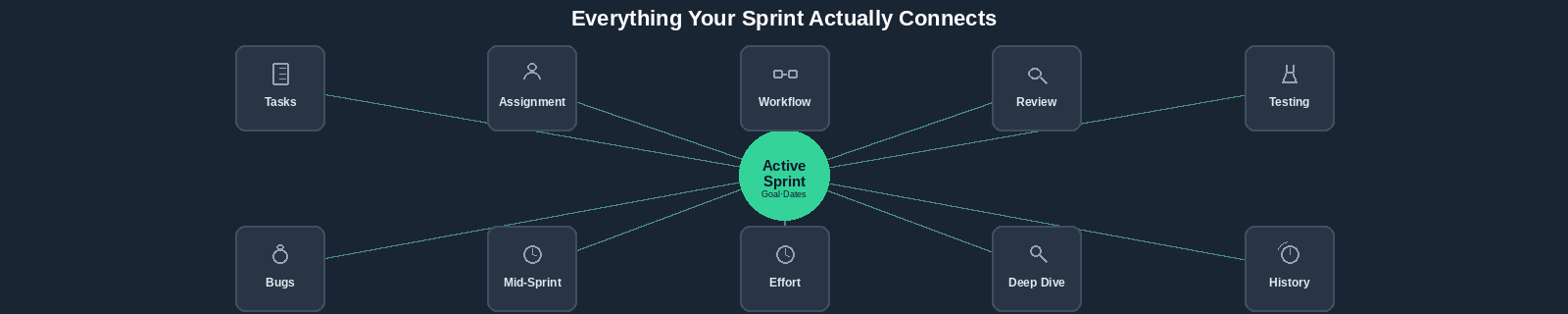
What Deskfactor Connects During a Sprint?
| Area | What the Team Needs to Understand |
| Sprint | Goal, dates, and planned capacity |
| Tasks | What needs to be delivered |
| Assignment | Who owns the work |
| Workflow | Where the work currently sits |
| Review | What is waiting for validation |
| Testing | Whether requirements actually work |
| Bugs | What failed and needs correction |
| Mid-sprint work | What changed after planning |
| Effort | How execution compares with expectations |
| Sprint Deep Dive | What is happening across the sprint |
| Sprint History | What can improve future planning |
Frequently Asked Questions
Deskfactor is a project execution and management platform designed to help software teams manage connected activities such as projects, sprints, tasks, bugs, testing, effort, and team execution from a shared workspace.
Yes. Teams can create sprints, define goals and capacity, associate work, track execution, identify mid-sprint additions, and analyze sprint progress and history.
Tasks moves through defined workflow states (To Do, In Progress, Ready for Review, In Review and Done) to show where work sits in the delivery pipeline.
Yes. It distinguishes work introduced during an active sprint from the original sprint scope to provide accurate performance context.
Yes. Testing and bug-management workflows remain connected to development work from implementation through validation and retesting.
AI assists with selected activities like generating candidate tasks from epics or test cases form task context, with all output subject to human user review.
Yes. Regardless of how code is written, projects still require requirements, ownnership, workflow visibility, testing, and delivery tracking.
While coding agents increase implementation throughput, review and testing capacity may not scale equally, making workflow visibility crucial for spotting bottlenecks.
From Sprint Activity to Delivery Visibility
The challenge of managing a sprint is understanding what happens after it starts. By connecting sprint planning with tasks, reviews, testing, bugs, effort, scope changes, and sprint analysis, Deskfactor helps teams move beyond basic activity tracking to answer the ultimate delivery question:
What did we plan, what changed, where is the work now, what is slowing us down, and what actually reached Done?