How DeskFactor Helps Software Teams Manage Projects, Tasks, Bugs and Sprints in One Place

Software development is more than managing a list of tasks.
A typical project involves requirements, epics, sprint planning, development tasks, reviews, testing, bugs, effort tracking, resource allocation, and continuous changes to scope and priorities.
The challenge is that these activities often become fragmented.
Project requirements may live in documents. Development work is tracked in a project management tool. Bugs may be maintained separately. Test cases may live in spreadsheets. Teams discuss blockers in chat, while project managers manually consolidate information for status reports.
The individual tools may work, but the overall delivery process becomes difficult to see.
DeskFactor is project management software designed to help software teams manage projects, sprints, tasks, bugs, testing, effort, and delivery visibility from a connected workspace.
Instead of treating project management as a collection of isolated tasks, DeskFactor focuses on connecting the different activities involved in delivering software.
Software Delivery Is More Than Managing a To-Do List
A basic task list can tell you:
- What needs to be done
- Who is assigned
- When it is due
- Whether it is complete
That works for simple projects. Software development introduces additional questions.
A project manager may need to know:
- Which tasks belong to this sprint?
- Which requirements are still incomplete?
- What is currently blocked?
- Which tasks are waiting for review?
- What bugs have been reported?
- Which test cases validate a requirement?
- How much effort has already been spent?
- What work was added after sprint planning?
- Which team members are overloaded?
- Is the project actually progressing toward delivery?
Answering these questions requires more than a digital to-do list. Software teams need a system that connects planning with execution.
What Should Software Project Management Software Provide?
Different organizations follow different development methodologies, but most software teams need visibility across several layers of work.
A typical delivery structure might look like:
Execution then introduces additional relationships:
The project management platform should help teams understand these relationships without forcing project managers to manually reconstruct them. This is the problem DeskFactor is designed to address.
1. Manage Projects From Planning to Delivery
Projects provide the top-level structure for organizing delivery. Within DeskFactor, teams can create projects and maintain important project information such as:
- Project name and code
- Client
- Project manager
- Project type
- Start and end dates
- Project status
- Billing model
- Budget information
- Visibility
This gives the organization a consistent starting point for project execution. The project then becomes the context for the epics, sprints, tasks, bugs, effort, and other delivery information associated with it. Instead of viewing individual tasks in isolation, teams can understand how the work contributes to the larger project.
2. Break Large Requirements Into Manageable Work
Large requirements are difficult to estimate, assign, track, and test. Deskfactor allows teams to organize work using structures such as:
For example, an epic might be Organization User Management. That could contain stories or tasks covering:
- Invite a new user
- Accept an organization invitation
- Assing a role
- Remove a user
- Resend an invitation
- Manage invitation expiry
Breaking requirements into smaller units gives project managers a clearer picture of progress while giving developers more specific deliverables. It also help testers understand what functionality needs to be validated.
AI-Assisted Task Generation
Breaking a detailed requirement or epic into implementation tasks can itself take significant planning effort. DeskFactor can use AI to assist with task generation from epic information.
Rather than asking AI to independently manage the project, the goal is to help the project team accelerate repetitive planning work. The generated tasks can then be reviewed and adjusted by the team before becoming part of the execution plan. This keeps the human decision-maker in control while using AI to reduce administrative effort.
3. Plan Work Through Sprints
For agile teams, a list of outstanding work is not enough. Teams need to decide what they intend to complete during a sepecific period. DeskFactor supports sprint-based planning so project teams can organize work around a defined sprint goal and delivery window.
Sprint information can include:
- Sprint title
- Start and end dates
- Planned capacity
- Sprint goal
- Additional planning notes
- Tasks included in the sprint
This creates a baseline for understanding what the team originally committed to delivering. That baseline becomes especially useful when priorities change during execution.
4. Track What Changes During the Sprint
Software projects change. A production issue may appear, a client may request an urgent change, or a technical dependency may create unexpected work. Preventing all mid-sprint changes is unrealistic.
The more important question is: What changed compared with what we originally planned? DeskFactor helps teams maintain visibility into sprint execution, including work that is added during the sprint.
This distinction matters. Imagine a team plans 20 tasks and later receives another five urgent tasks. If the team completes 20 tasks, looking only at the original commitment may make the sprint appear successful. Looking only at the final scope may make the team appear to have missed five tasks. The real story is the scope changed during execution. Project managers need that context when evaluating sprint performance.
5. Manage Tasks Through a Defined Workflow
Creating a task is only the beginning. A task needs to move through the delivery process. A typical software workflow might look like:
Teams may also need to identify work that is Blocked. The exact workflow can vary between organizations, but the principle remains the same: the current stage of work should be visible.
A developer finishing implementation does not necessarily mean the work is complete. The task may still require review, testing, or corrections. Making those stage visible helps prevent a common project-management problem where development appears nearly complete while a large amount of work is still waiting for validation.
6. Keep Task Information in Context
A software task often requires more information than a title and status. DeskFactor tasks can maintain delivery information such as:
- Description
- Priority
- Assignee
- Start date
- Due date
- Estimated hours
- Story points
- Acceptance criteria
- Sprint association
- Task relationships
- Comments and supporting information
Keeping this context with the task reduces the need for developers and testers to search across multiple conversations and documents to understand what needs to be delivered. A good task should allow the assignee to understand what needs to be done, why it is required, and how completion will be verified.
For a deeper explanation of structuring software tasks, read What is Task Management? A practical Guide for Software Teams.
7. Make the Review Process Visible
One of the most common hidden bottlenecks in software delivery occurs after development. A developer may finish several tasks, but those tasks still need to be reviewed or tested. If the project only tracks Open -> Done, this unfinished work can become difficult to see.
DeskFactor supports workflows where work can move through stages such as Ready for Review -> In Review. This allows teams to distinguish between work still being developed, work waiting for review, work actively being reviewed, and completed work.
For project managers, this creates an important delivery signal. If the development queue is shrinking while the review queue keeps growing, the project has not necessarily accelerated. The bottleneck has simply moved.
8. Manage Bugs Alongside Development Work
Bugs are part of software delivery. The challenge is ensuring they remain connected to the development and testing process rather than becoming an isolated list of defects.
DeskFactor supports structured bug management with workflow states that can represent stages such as:
Teams can also distinguish reports that are determined to be Not a Bug, helping avoid treating invalid reports as developer defects. When an attempted resolution does not fix the issue, the bug can move back into the appropriate workflow for further development. This gives developers, testers, and project managers a shared understanding of the current state of each reported issue.
9. Connect Testing With Development
Testing becomes more effective when it is connected to the requirement being validated. Instead of treating test cases as completely separate documentation, software teams benefit from understanding relationships such as:
This makes several questions easier to answer:
- How was this task validated?
- Which scenarios were tested?
- Which bugs were discovered during testing?
- Which requirement does this bug relate to?
DeskFactor supports test case management as part of the software-delivery workflow, helping QA activities remain connected with project execution.
10. Generate Test Cases From Tasks With AI
Creating thorough test cases can take significant time, particularly when testers need to repeatedly interpret task descriptions and acceptance criteria. DeskFactor uses AI to assist with generating test cases from task information. The AI can analyze information such as task titles, descriptions, acceptance criteria, task types, priorities, and project context to propose relevant test scenarios.
The generated test cases can then be reviewed by the QA team before being used. The objective is not to remove testers from the process. A tester still provides critical judgment around business risk, edge cases, user behavior, integration scenarios, regression impact, and real-world validation. AI instead acts as an assistant that can help create an initial testing baseline more quickly.
11. Track Bugs and Test Cases Together
When bugs and test cases exist in separate systems, traceability becomes difficult. A tester may discover an issue while executing a specific scenario, but weeks later the relationship between the defect and the original test may no longer be obvious.
DeskFactor allows bugs and test cases to remain associated. That provides useful context during development and future regression testing. A team can understand not only that a bug existed but also which validation scenario exposed it.
12. Track Effort Alongside Work
Project progress is not only about whether tasks are open or closed. Effort matters too. Suppose a task was estimated at four hours but required 16 hours. The task may still be completed successfully, but the difference provides useful planning information.
Across multiple tasks, effort data can help teams identify underestimated work, unexpected technical complexity, repeated estimation patterns, areas consuming disproportionate effort, and capacity constraints. DeskFactor supports effort tracking so project teams can compare planned work with the effort actually being consumed during execution, giving project managers another perspective beyond simple completion percentages.
13. Understand Resource Utilization
A project can be behind schedule even when the organization has enough people. The problem may be how those people are allocated. One developer may have significantly more work than others, a tester may become the bottleneck for several developers, or a critical specialist may be assigned across too many projects.
Resource visibility helps project managers understand whether delivery problems are caused by the amount of work, the available capacity, or how work has been distributed. DeskFactor brings resource information closer to project execution so teams can make better allocation decisions.
14. Identify Delivery Risks Earlier
The purpose of project visibility is not simply to create attractive dashboards. It is to help people make decisions. Consider two project updates:
- Update 1: Project Completion: 72%
- Update 2: Five tasks are overdue, two high-priority tasks are blocked, eight tasks are waiting for review, and six tasks were added after sprint planning.
The second update gives the project manager something actionable. DeskFactor is designed to surface execution information such as open work, completed work, blocked tasks, overdue tasks, review queues, sprint changes, bug status, effort, and resource utilization. The objective is to help teams identify problems while there is still time to respond.
If your projects frequently appear healthy until shortly before a deadline, see Why Software Teams Miss Deadlines: 8 Task Management Problems and How to Fix Them.
Why Connecting Project Information Matters
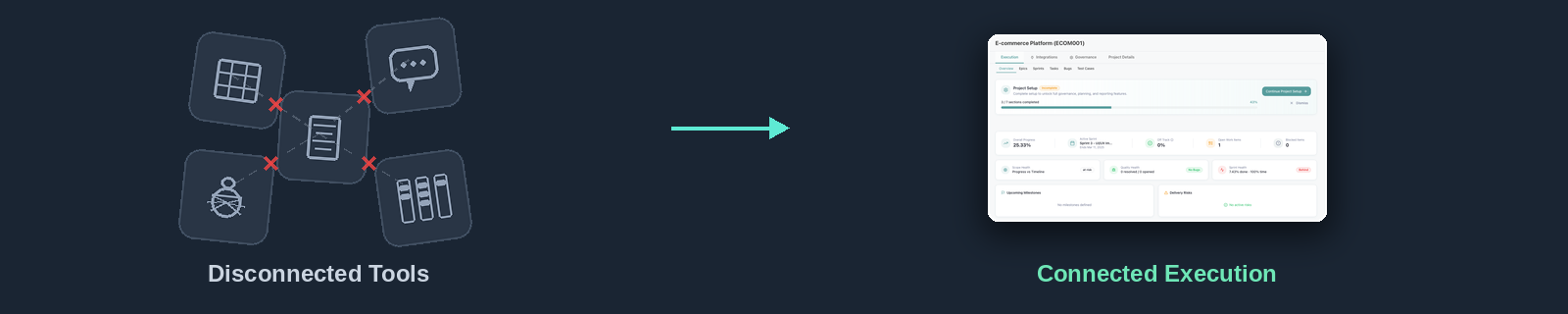
Consider a project manager investigating why a sprint is falling behind. With disconnected tools, they may need to check a project tool, spreadsheet, bug tracker, test management system, timesheet, and chat, and then manually interpret what happened.
When delivery information is connected, the investigation becomes more direct:
That is much more useful than knowing only that the task is “not done”. Context explains the reason behind the status.
Disconnected Tools vs. Connected Project Execution
| Disconnected Approach | Connected Project Execution (DeskFactor) |
| Requirements separate from execution | Requirements connected to delivery work |
| Tasks tracked independently | Tasks organized within project context |
| Sprint changes difficult to identify | Sprint scope changes remain visible |
| Review work hidden | Review stages are tracked |
| Bugs maintained separately | Bugs remain part of delivery |
| Test cases isolated from tasks | Testing connected with requirements |
| Effort tracked separately | Effort associated with project work |
| Reporting requires consolidation | Delivery information available centrally |
| Status shows what happened | Relationships help explain why |
The goal is not necessarily to replace every tool an organization uses. Source control, communication, infrastructure monitoring, design, documentation, and many other specialized tools will continue to play important roles. The goal is to create a reliable system of record for project execution.
Who Is DeskFactor Designed For?
DeskFactor can be useful for organizations where software delivery requires coordination across multiple roles:
- Software Development Companies: Development agencies and service companies often manage multiple clients, projects, teams, deadlines, and billing models simultaneously. Centralized project visibility becomes increasingly important as the number of projects grows.
- Product Development Teams: Product teams can organize requirements, epics, sprints, development work, testing, and bugs around ongoing product development.
- Startups: Growing startups often begin with simple task lists and spreadsheets. As the development team expands, they need more structured workflows without losing visibility.
- QA-Intensive Teams: Teams where testing plays a significant role can benefit from keeping tasks, test cases, reviews, and bugs connected.
- Distributed Development Teams: When developers, testers, and project managers work from different locations, the project system needs to communicate the current state of work without depending entirely on meetings.
Where AI Fits Into DeskFactor?
AI is becoming increasingly useful in software project management, but DeskFactor’s approach is based on an important distinction: AI should assist project teams, not remove human judgment from project delivery.
For example, AI can help:
- Convert epics into proposed implementation tasks
- Generate test cases from task requirements
- Reduce repetitive planning work
But the project manager still decides what belongs in the plan, the developer still evaluates technical implementation, and the tester still determines whether the proposed test coverage is sufficient. AI accelerates parts of the workflow while people remain responsible for decisions. This creates a practical model of AI-assisted project execution.
Frequently Asked Questions About DeskFactor
DeskFactor is a project management platform designed to help teams manage project execution through connected projects, epics, sprints, tasks, reviews, bugs, testing, effort, resources, and delivery visibility.
Yes. DeskFactor supports software-development workflows involving project managers, developers, testers, and other delivery roles. It can be used to organize requirements, plan sprints, manage tasks, track reviews, manage bugs, maintain test cases, and monitor project execution.
Yes. Teams can organize work into epics, stories, tasks, and subtasks and use sprints to plan and track Agile delivery.
Yes. Teams can create sprints, define sprint periods and goals, plan capacity, associate work with sprints, and monitor execution during the sprint.
Yes. DeskFactor includes bug management workflows that allow teams to track reported issues from initial reporting through assignment, development, review, resolution, or classification as Not a Bug.
DeskFactor supports test case management and allows testing activities to remain connected with development work and bugs.
Yes. DeskFactor includes AI-assisted capabilities such as generating proposed tasks from epics and generating test cases from task information. The generated output is intended to support the project team and can be reviewed before being used.
From Managing Tasks to Managing Delivery
Software project management should answer more than: What tasks do we have?
It should help teams understand what was planned, what is being worked on, what is blocked, what is waiting for review, what still needs testing, what bugs are affecting delivery, what changed during the sprint, how much effort is being consumed, and where the project is at risk.
That requires connecting the different parts of software delivery rather than treating them as isolated activities. DeskFactor brings projects, epics, sprints, tasks, reviews, test cases, bugs, effort, resources, and AI-assisted workflows into a connected project execution platform—giving software teams a clearer view from planning through delivery.
For teams that have outgrown disconnected task lists and manual project reporting, the next step is not simply tracking more information. It is connecting the information that already drives delivery.